开始开展NGINX Modern Apps Reference Architecture(MARA)项目时,我们选择AWS作为IaaS提供商,因为我们已经熟悉该平台,并且可以使用部门预算支付相关费用。当然,并非所有人都有同样的经验或预算。许多人希望我们提供在本地运行MARA的方案,例如在实验室环境甚至工作站上,使用K3s、Canonical MicroK8s和minikube等Kubernetes发行版。
我们听到了大家的需求。今天,我们很高兴地宣布,MARA已通过MicroK8s测试,并提供了相关说明,帮助您自行部署!
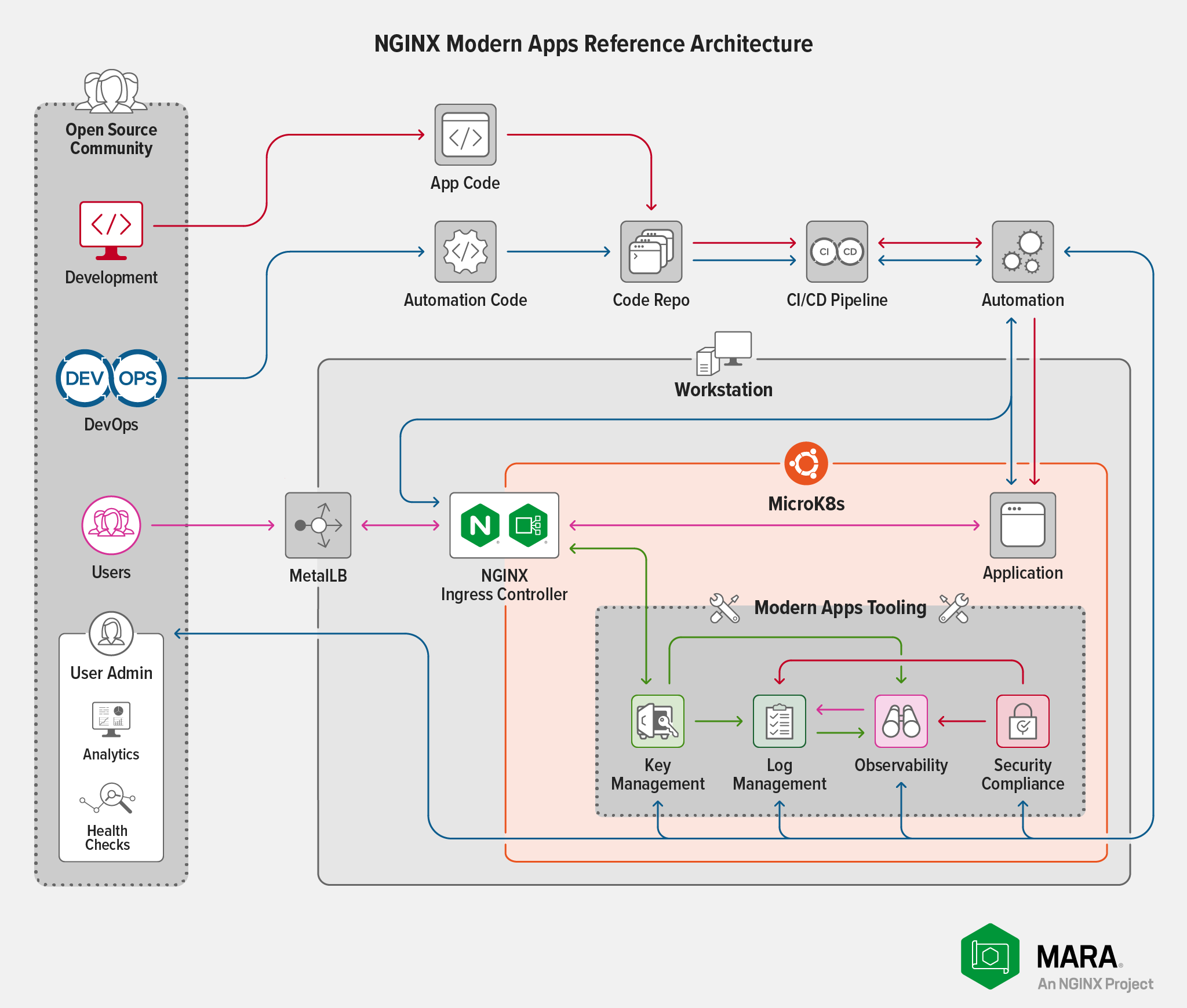
为什么选择MicroK8s进行测试?因为它采用易于部署且内存占用较低的模式,可提供MARA所需的DNS、存储和出站流量功能。借助MicroK8s,我们可以轻松地反复迭代测试场景,从而确定在达到合理性能水平的情况下,部署所需满足的最低要求。
我们希望这项工作能帮助我们测试其他Kubernetes发行版。有关各发行版的当前状态,请参阅我们的GitHub仓库。如果您希望列表中加入自己青睐的发行版,欢迎创建分支、进行测试并提交拉取请求!
应对资源限制
在本地运行MARA时,内存和CPU是主要的资源限制。初步测试发现,大多数内存耗尽问题都与Elasticsearch有关。在内存极少(低于16 GB)的配置中,Kibana几乎无法使用。为解决此问题,我们在MARA配置文件中提供了相关设置,用于取消完整Elasticsearch部署通常具备的冗余保护。虽然这会增加潜在故障模式的数量,但在资源受限的环境中,这是必要的权衡。
CPU限制与示例应用承受的负载量直接相关:Bank of Sirius。MARA部署中包含Locust,用于为Bank of Sirius生成负载,并允许用户设置用户数量和新用户生成速率。
请注意,增加Bank of Sirius的负载也会影响系统的其他部分。如果用户数或用户生成速率过高,MARA的性能会下降,组件可能会崩溃或停滞。导致此行为的具体值取决于可用的CPU,但容量至少达到要求中规定值的部署预计可处理最多64个用户以及每次生成16个用户所产生的负载。
在MicroK8s上部署MARA
了解上述背景后,就可以在MicroK8s上部署MARA了!
要求
root访问权限。该系统可以是裸机 Linux 服务器、虚拟化系统或云系统,需运行 Ubuntu 20.04 (Focal) 或更高版本,并至少满足以下要求:- 20 GB 磁盘空间
- 16 GB 内存
- 相当于4个CPU
- 本地系统上的Python 3虚拟环境,其中包含MARA所需的所有库和二进制文件。如果尚未安装Python 3,请运行以下命令:
$ sudo apt update$ sudo apt install -y python3-venv- 至少需要一个空闲的IPv4地址,供MicroK8s集成的MetalLB负载均衡器分配给NGINX Ingress Controller的出口。如果通过localhost访问Bank of Sirius应用程序,则可使用任何符合RFC 1918规范的可用私有地址。例如,如果网络为192.168.100.0/24,则可以使用10.10.10.10之类的地址。
- Pulumi账户和访问令牌。如果尚未拥有,可在第 1 步中创建,具体请参阅部署 MARA。请注意,虽然Pulumi允许将状态文件存储在兼容S3的对象存储或本地文件系统中,但截至本文撰写时,MARA尚不支持此功能。MARA或Pulumi的未来版本将取消此限制。
安装并配置MicroK8s
- 安装MicroK8s:
$ sudo snap install microk8s --classicmicrok8s (1.23/stable) v1.23.3 from Canonical✓ installed- 设置运行
microk8s命令所需的权限。请将<username>替换为在系统上拥有root权限的账户:
$ sudo usermod -a -G microk8s <username>$ sudo chown -f -R <username> ~/.kube
$ newgrp microk8s- 退出具有 root 权限的账户,然后重新登录,以使新权限生效。
- 启用MicroK8s的以下附加组件:DNS、存储和MetalLB。出现提示时,请指定以下格式的IP地址范围:
X.X.X.X‑X.X.X.Y,用于表示以下任一项:
$ microk8s enable dns storage metallbEnabling DNS
Applying manifest
...
Restarting kubelet
DNS is enabled
Enabling default storage class
...
Storage will be available soon
Enabling MetalLB
Enter each IP address range delimited by comma (e.g. '10.64.140.43-10.64.140.49,192.168.0.105-192.168.0.111'): 192.168.100.100-192.168.100.110
Applying Metallb manifest
...
MetalLB is enabled- 实际的私有IP地址范围(例如,
192.168.100.100-192.168.100.110,即下文使用的值) - 单个私有IP地址(例如,
192.168.100.100-192.168.100.100)
- 确认MicroK8s正在运行:
$ microk8s statusmicrok8s is running
high-availability: no
  datastore master nodes: 127.0.0.1:19001
  datastore standby nodes: none
addons:
  enabled:
    dns           # CoreDNS
    ha-cluster    # Configure high availability on the current node
    metallb       # Loadbalancer for your Kubernetes cluster
    storage       # Storage class; allocates storage from host directory
...- 将MicroK8s配置加载到大多数实用工具预期的文件(~/.kube/config)中,并为该目录和文件设置建议的权限:
$ microk8s config > ~/.kube/config$ sudo chmod 0644 ~/.kube/config克隆MARA代码仓库并设置MicroK8s集群
- 克隆MARA存储库并初始化Bank of Sirius子模块:
$ git clone https://github.com/nginxinc/kic-reference-architectures.git$ cd kic-reference-architectures/
$ git submodule update --init --recursive --remote- 在克隆的MARA存储库根目录中(上一步已切换到该目录),为MicroK8s集群设置Python虚拟环境:
$ ./bin/setup_venv.sh- 此命令会生成较长的跟踪记录。如果出现错误,请查看MARA GitHub仓库中的“已知问题和注意事项”部分以获取建议。
- 激活Python虚拟环境。该命令会设置
PATH及其他环境变量,以使用该虚拟环境:
$ source ./pulumi/python/venv/bin/activate- 确认MicroK8s集群已针对MARA部署正确配置:
$ ./bin/testcap.sh
This script will perform testing on the current kubernetes installation using the currently active kubernetes configuration and context.
Any failures should be investigated, as they will indicate that the installation does not meet the minimum set of capabilities required to run MARA.

...
==============================================================
| All tests passed! This system meets the basic requirements |
| to deploy MARA.                                            |
==============================================================
部署MARA
本节用于部署MARA的start.sh脚本支持需要执行额外操作才能成功部署的选项。为简单起见,此处假设采用满足以下条件的基本部署:
- 使用kubeconfig文件,而不是其他受支持的部署选项。有关其他选项的详细信息,请参阅GitHub存储库中的《入门指南》。
- 使用我们已测试过MARA的最新NGINX Open Source版本(不一定是当前发布的最新版本)。
- 使用基于NGINX Open Source的NGINX Ingress Controller。如果要使用基于NGINX Plus的NGINX Ingress Controller,则必须在Kubernetes集群中使用F5 Docker注册表中基于NGINX Plus的镜像。有关更多信息,请参阅下方
注意!中的第一个步骤3。 - 使用单个标准Kubernetes上下文。请参阅第3步中的第二个“
注意!”。
在MicroK8s集群中部署MARA:
- 运行
start.sh脚本。如果尚未将工作站配置为使用Pulumi,系统会引导您登录Pulumi(必要时创建账户),然后提示您输入与Pulumi账户关联的API令牌。
$ ./bin/start.shAdding to [/home/ubuntu/kic-reference-architectures/bin/venv/bin] to PATH
Manage your Pulumi stacks by logging in.
Run `pulumi login --help` for alternative login options.
Enter your access token from https://app.pulumi.com/account/tokens
    or hit <ENTER> to log in using your browser            : <token>

Please read the documentation for more details.- 选择部署类型,在提示符下输入“
k”,使用kubeconfig文件构建部署。忽略有关未安装“make”和Docker的警告,因为该部署改用注册表中的NGINX Ingress Controller镜像。
Type a for AWS, k for kubeconfig? k
Calling kubeconfig startup script
make is not installed - it must be installed if you intend to build NGINX Kubernetes Ingress Controller from source.
docker is not installed - it must be installed if you intend to build NGINX Kubernetes Ingress Controller from source.- 出现提示时,指定要创建的Pulumi堆栈名称(此处为
mara)。该名称在您的Pulumi账户中必须唯一。
Enter the name of the Pulumi stack to use in all projects: maraSubmodule source found
Configuring all Pulumi projects to use the stack: mara
Created stack 'mara'

NOTICE! Currently the deployment via kubeconfig only supports pulling images from the registry! A JWT is required in order to access the NGINX Plus repository. This should be placed in a file in the extras directory in the root, in a file named jwt.token

See https://docs.nginx.com/nginx-ingress-controller/installation/using-the-jwt-token-docker-secret/ for more details and examples.

No JWT found; writing placeholder manifest

NOTICE! When using a kubeconfig file you need to ensure that your environment is configured to connect to Kubernetes properly. If you have multiple kubernetes contexts (or custom contexts) you may need to remove them and replace them with a simple ~/.kube/config file. This will be addressed in a future release.- 根据提示,指定kubeconfig文件的完整路径和集群名称。此处分别为
/home/<username>/.kube/config和microk8s-cluster。
Provide an absolute path to your kubeconfig filevalue: /home/<username>/.kube/config
Provide your clustername
value: microk8s-cluster
Attempting to connect to kubernetes cluster- 在下一个提示中指定集群的完全限定域名(FQDN)。该脚本将FQDN用于两个目的:配置NGINX Ingress Controller和创建自签名证书(后一个用途意味着该值不能是IP地址)。如果使用其他FQDN替换
mara.example.com,请记得在后续步骤中也使用该FQDN。
Create a fqdn for your deploymentvalue: mara.example.com- 指定 Grafana 管理员密码:
Create a password for the grafana admin user; this password will be used to access the Grafana dashboardThis should be an alphanumeric string without any shell special characters; it is presented in plain text due to current limitations with Pulumi secrets. You will need this password to access the Grafana dashboard.
value: <password>
系统会显示安装过程的跟踪记录,其中包含每个步骤的以下信息:
- 描述该步骤所执行关键操作的横幅(例如,
Logstore表示开始部署Elasticsearch) - Pulumi将要执行的任务列表
- 每项Pulumi任务的实时状态指示器
- Pulumi和MARA生成的诊断信息,例如已定义的主机名和IP地址
- 受影响的资源数量
- 已用时间
最后一个步骤(针对 Bank of Sirius)完成后,跟踪信息会报告 MetalLB 分配给 NGINX Ingress Controller 的 IP 地址(此处为 192.168.100.100),以及为该部署选择的 FQDN(此处为 mara.example.com)和其他部署信息。
The startup process has finished successfully
Next Steps:
1. Map the IP address (192.168.100.100) of your Ingress Controller with your FQDN (mara.example.com).
2. Use the ./bin/test-forward.sh program to establish tunnels you can use to connect to the management tools.
3. Use kubectl, k9s, or the Kubernetes dashboard to explore your deployment.

To review your configuration options, including the passwords defined, you can access the pulumi secrets via the following commands:

Main Configuration: pulumi config -C /jenkins/workspace/jaytest/bin/../pulumi/python/config

Bank of Sirius (Example Application) Configuration: pulumi config -C /jenkins/workspace/jaytest/bin/../pulumi/python/kubernetes/applications/sirius

K8 Loadbalancer IP: kubectl get services --namespace nginx-ingress

Please see the documentation in the github repository for more information- 在用于解析FQDN的工具(例如本地/etc/hosts文件或DNS服务器)中,为上一步报告的FQDN和IP地址创建映射。
- 验证向MARA部署发送的请求是否成功。添加
-k选项,使curl接受自签名证书。要显示有关该证书的更多信息,请添加-v选项。
$ curl -k -I https://mara.example.comHTTP/1.1 200 OK
Server: nginx/1.21.5
Date: Day, DD Mon YYYY hh:mm:ss TZ
Content-Type: text/html; charset=utf-8
Content-Length: 7016
Connection: keep-alive- 在浏览器中访问https://mara.example.com,打开 Bank of Sirius 网站。截至本文撰写时,在许多浏览器(包括 Firefox 和 Safari)中,可以安全地忽略网站使用自签名证书的警告并继续访问。建议不要使用 Chrome,因为近期的安全变更可能会阻止访问该网站。
- 运行
test-forward.sh脚本以设置Kubernetes端口转发,从而访问MARA管理套件中的工具,包括Elasticsearch、Grafana、Kibana、Locust和Prometheus。该脚本会确定适当的服务名称,并运行kubectl命令将这些服务转发到本地端口。注意:为确保端口转发正常工作,浏览器必须与运行此命令的命令行终端位于同一系统上。否则(例如,使用虚拟化环境时),命令看似执行成功,但端口转发实际上并未生效。有关更多信息,请参阅GitHub存储库中的《访问MARA中的管理工具》。
$ ./bin/test-forward.shConnections Details
====================================
Kibana:        http://localhost:5601
Grafana:       http://localhost:3000
Locust:        http://localhost:8089
Prometheus:    http://localhost:9090
Elasticsearch: http://localhost:9200
====================================

Issue Ctrl-C to Exit
摘要
就是这样!按照这些说明操作,大约20分钟即可在您的环境中启动并运行可用的MARA部署。此时,您可以像使用任何其他Kubernetes应用一样与Bank of Sirius应用交互。建议先使用内置的可观测性工具,通过Locust生成不同程度的负载,测试环境在这些负载下的表现。
我们的目标是让MARA为尽可能多的Kubernetes用户发挥更大作用。如果不认同我们对某些组件的选择,欢迎替换为自己的组件;如果愿意分享,还可以发起拉取请求。此外,欢迎在代码仓库的Issues和Discussions页面分享想法并提出问题,包括对我们所作的任何存疑假设提出质疑。
相关文章
本文是系列文章的一部分。随着我们逐步为MARA增加功能,我们将在博客中发布详细信息:
- 全新的开源现代应用参考架构
- 将OpenTelemetry集成到现代应用参考架构中:进展报告
- MARA:现已可在您身边的工作站上运行(本文)
- NGINX现代应用参考架构1.0.0版正式发布
相关博客文章

NGINX Plus R26 正式发布
NGINX Plus R26通过缓存JSON Web密钥集加快JWT验证,并强化TLS握手,从而提升安全性。NGINX JavaScript的新功能包括增强对异步函数的支持,以及实现WebCrypto API。
使用NGINX App Protect DoS保护gRPC应用,抵御严重的DoS攻击
gRPC具备开发人员设计和部署现代应用所需的速度与灵活性,但其开放性也使其极易受到第7层DoS攻击。NGINX App Protect DoS可保护gRPC应用免受此类破坏性攻击。
Ingress Controller 选型指南(第 2 部分):风险与面向未来的规划
了解选择错误的Ingress控制器可能带来的风险,以及如何从关键方面着手,让您的选择更好地适应未来需求。
NGINX Plus R19 正式发布
NGINX Plus R19扩展了监控功能,不仅提供更多指标,还新增了指标分析方式;增加试运行模式,用于测试限速效果;增强键值存储,以支持IP地址范围;并使限速更加动态。
NGINX现已正式加入F5
NGINX现已正式成为F5的一部分。Gus Robertson现任F5 NGINX业务部门负责人。他阐述了两家公司在人才、文化和愿景方面融合的价值,以及双方将如何携手增强NGINX的开源产品和商业产品。