长期以来,NGINX一直是支持高性能Web服务器和负载均衡器的主流选择之一。随着微服务架构的兴起以及高效API管理需求的增长,NGINX也成为构建API网关的热门选择。
本文将介绍如何使用声明式API方法,将OpenAPI架构定义转换为可作为API网关运行的完整NGINX配置,并提供Web应用防火墙安全防护和开发者门户。
我们将提供分步说明和实用见解,介绍如何利用NGINX Plus简化API管理流程,并确保应用实现理想性能。
API网关简介
API网关是管理和保护客户端与后端服务之间通信的中心枢纽。它充当位于客户端与后端服务器之间的反向代理,将传入的请求路由并分发到相应的服务。这有助于提高客户端与服务之间的通信效率,同时让API网关能够处理以下任务:身份验证、授权、速率限制和缓存。
此外,API网关还可充当安全层,保护后端服务免受潜在威胁和攻击。它可以实施加密、基于令牌的身份验证和访问控制等安全措施,确保只有获得授权的用户才能访问服务。API网关通过集中管理这些安全功能,有助于简化系统的整体安全架构,并降低跨多个服务实施安全措施的复杂性。
NGINX Declarative API 项目
由社区支持的NGINX Declarative API项目为NGINX Instance Manager提供一组声明式REST API。
它可用于管理NGINX Plus配置生命周期,并使用JSON服务定义创建NGINX Plus配置。与NGINX Instance Manager配合使用时支持GitOps集成:系统会检查事实来源中引用对象的更新,并自动保持NGINX配置同步。
OpenAPI架构可用于自动将NGINX配置为API网关。可通过Redocly创建开发者门户。
先决条件
要运行本博客中的内容,需要:
- 一个正在运行的NGINX Instance Manager
- 订阅(或30 天免费试用)NGINX Plus和NGINX App Protect WAF。NGINX Agent必须安装,以连接到 NGINX Instance Manager,并加入
declarativeAPITest实例组 - 一台安装了docker和docker-compose的Linux主机(裸机或虚拟机),用于运行NGINX Declarative API项目
- 用于提交声明式API请求的Postman
- 用于运行Postman的客户端主机
实验概述
安装并运行所有必备组件后,NGINX Instance Manager 会显示 NGINX Plus 实例已联机,并启用了 NGINX App Protect WAF。
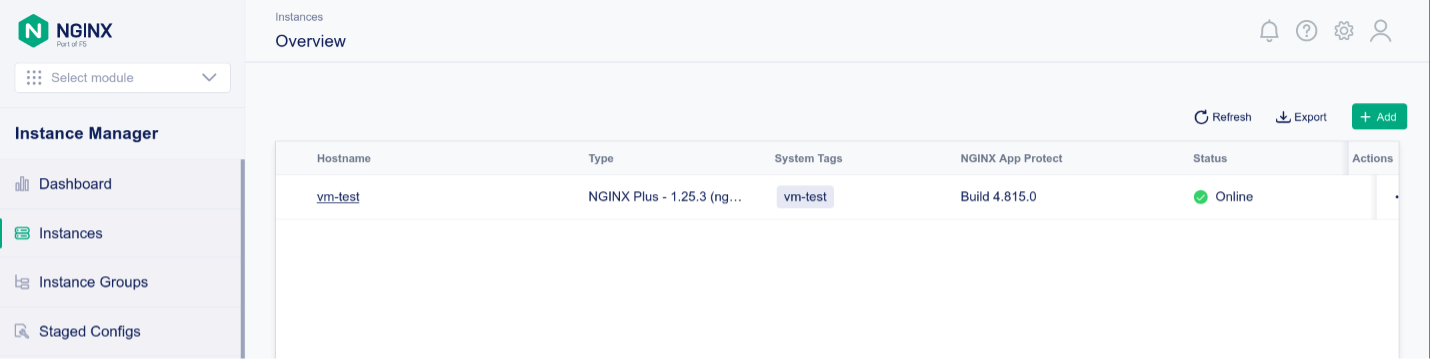
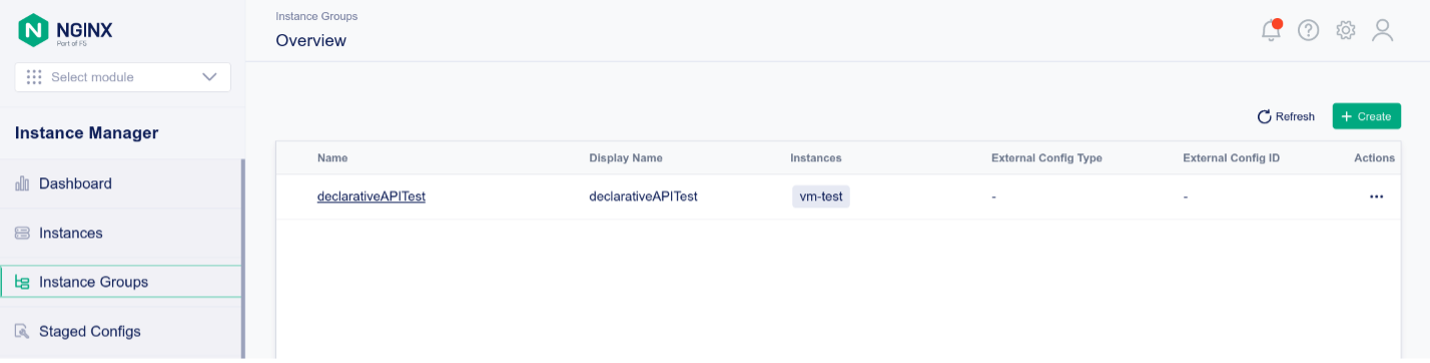
该NGINX Plus实例属于declarativeAPITest实例组
部署声明式API
NGINX Declarative API项目依赖NGINX Instance Manager提供的REST API,并提供基于JSON的声明式抽象。按照以下说明运行Declarative API项目:
1. 运行 docker ps,验证 Docker 是否正在运行:
f5@ubuntu:~$ docker ps
CONTAINER ID   IMAGE     COMMAND   CREATED   STATUS    PORTS     NAMES
2. 在Linux主机上克隆Github存储库:
f5@ubuntu:~$ git clone https://github.com/f5devcentral/NGINX-Declarative-API/
Cloning into 'NGINX-Declarative-API'...
remote: Enumerating objects: 4072, done.
remote: Counting objects: 100% (1982/1982), done.
remote: Compressing objects: 100% (1332/1332), done.
remote: Total 4072 (delta 668), reused 876 (delta 609), pack-reused 2090
Receiving objects: 100% (4072/4072), 19.05 MiB | 4.88 MiB/s, done.
Resolving deltas: 100% (1154/1154), done.
f5@ubuntu:~$
3. 切换到docker-compose目录:
f5@ubuntu:~$ cd NGINX-Declarative-API/contrib/docker-compose/
4. 使用nginx-dapi.sh脚本通过docker-compose启动所有容器。首次启动时,系统会自动构建所有Docker镜像:
f5@ubuntu:~/NGINX-Declarative-API/contrib/docker-compose$ ./nginx-dapi.sh -c start
-> Updating docker images
[+] Pulling 11/11
[...]
-> Deploying NGINX Declarative API
[+] Running 4/4
 ✔ Network nginx-dapi_dapi-network  Created 0.1s
 ✔ Container redis                  Started 1.5s
 ✔ Container devportal              Started 1.5s
 ✔ Container nginx-dapi             Started
5. 检查正在运行的Docker容器:
f5@ubuntu:~/NGINX-Declarative-API/contrib/docker-compose$ docker ps
CONTAINER ID   IMAGE                             COMMAND                  CREATED         STATUS         PORTS                                       NAMES
e29a2f783da2   nginx-declarative-api             "/deployment/env/bin…"   5 minutes ago   Up 5 minutes   0.0.0.0:5000->5000/tcp, :::5000->5000/tcp   nginx-dapi
97142840eaf7   redis                             "docker-entrypoint.s…"   5 minutes ago   Up 5 minutes   0.0.0.0:6379->6379/tcp, :::6379->6379/tcp   redis
6b50c0426643   nginx-declarative-api-devportal   "/deployment/src/sta…"   5 minutes ago   Up 5 minutes   0.0.0.0:5001->5000/tcp, :::5001->5000/tcp   devportal
6. 在客户端主机上运行Postman,并导入以下位置的NGINX Declarative API集合:https://raw.githubusercontent.com/f5devcentral/NGINX-Declarative-API/main/contrib/postman/NGINX%20Declarative%20API.postman_collection.json
7. 编辑Postman集合变量,使其适配您的环境:
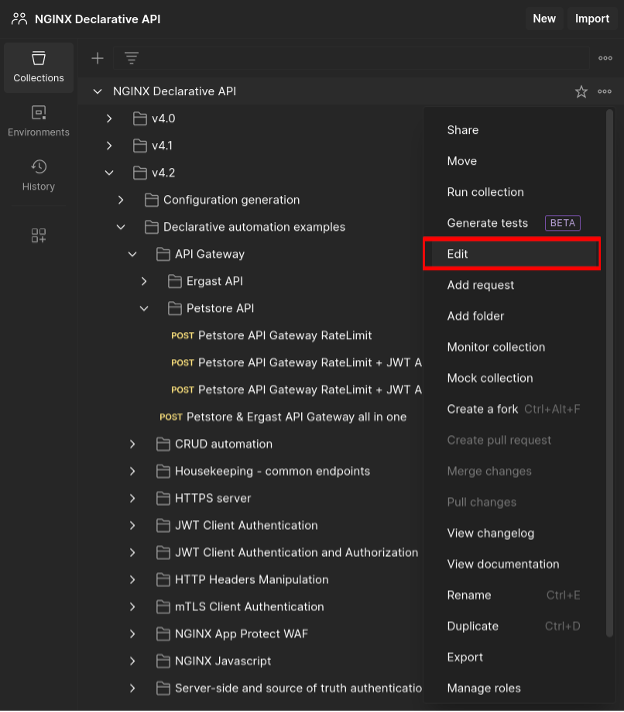
8. 设置以下变量:
ncg_host,运行Declarative API docker-compose的Linux主机的主机名或IP地址ncg_port- NGINX Declarative API的TCP端口:默认值为5000nim_host- NGINX Instance Manager 基础URL(例如 https://nms.k8s.ie.ff.lan)nim_username- NGINX Instance Manager身份验证用户名nim_password- NGINX Instance Manager身份验证密码
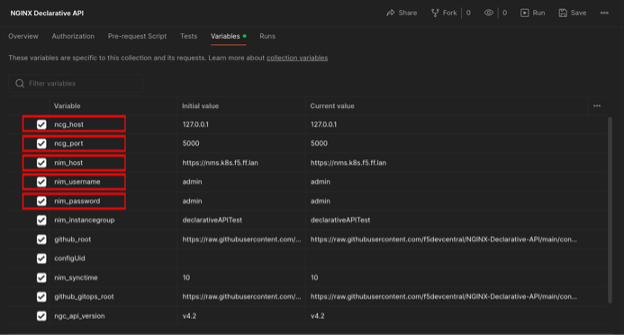
9. 在Postman中保存所有更改
10. 在Postman集合中,浏览至“Petstore API Gateway RateLimit + JWT AuthN/AuthZ + WAF”,然后打开该请求
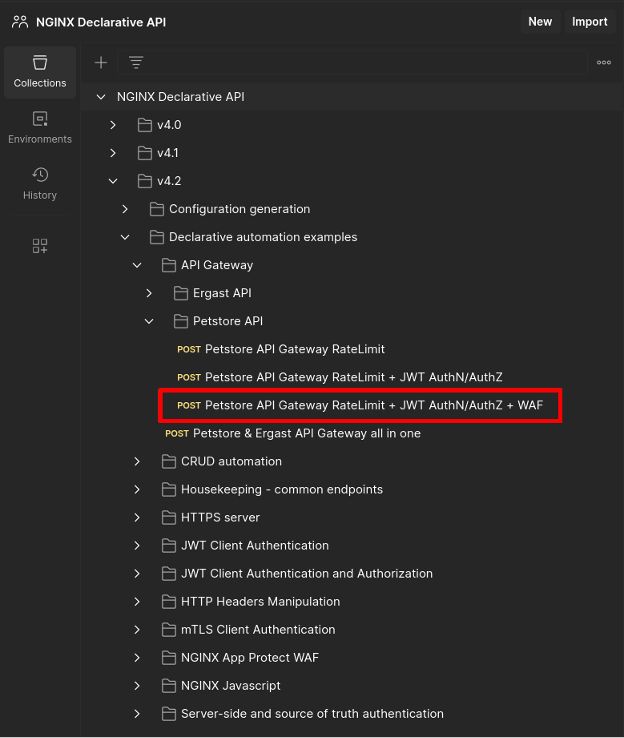
JSON声明如下:
{
    "output": {
        "type": "nms",
        "nms": {
            "url": "{{nim_host}}",
            "username": "{{nim_username}}",
            "password": "{{nim_password}}",
            "instancegroup": "{{nim_instancegroup}}",
            "synctime": 0,
            "modules": [
                "ngx_http_app_protect_module"
            ],
            "certificates": [
                {
                    "type": "certificate",
                    "name": "test_cert",
                    "contents": {
                        "content": "{{github_gitops_root}}/v4.2/testcert.crt"
                    }
                },
                {
                    "type": "key",
                    "name": "test_key",
                    "contents": {
                        "content": "{{github_gitops_root}}/v4.2/testcert.key"
                    }
                }
            ],
            "policies": [
                {
                    "type": "app_protect",
                    "name": "production-policy",
                    "active_tag": "xss-blocked",
                    "versions": [
                        {
                            "tag": "xss-blocked",
                            "displayName": "Production Policy - XSS blocked",
                            "description": "This is a production-ready policy - XSS blocked",
                            "contents": {
                                "content": "{{github_gitops_root}}/v4.2/nap-policy-xss-blocked-bot-allowed.json"
                            }
                        },
                        {
                            "tag": "xss-allowed",
                            "displayName": "Production Policy - XSS allowed",
                            "description": "This is a production-ready policy - XSS allowed",
                            "contents": {
                                "content": "{{github_gitops_root}}/v4.2/nap-policy-xss-allowed.json"
                            }
                        }
                    ]
                }
            ]
        }
    },
    "declaration": {
        "http": {
            "servers": [
                {
                    "name": "Petstore API",
                    "names": [
                        "apigw.nginx.lab"
                    ],
                    "resolver": "8.8.8.8",
                    "listen": {
                        "address": "0.0.0.0:443",
                        "http2": true,
                        "tls": {
                            "certificate": "test_cert",
                            "key": "test_key",
                            "ciphers": "DEFAULT",
                            "protocols": [
                                "TLSv1.2",
                                "TLSv1.3"
                            ]
                        }
                    },
                    "log": {
                        "access": "/var/log/nginx/apigw.nginx.lab-access_log",
                        "error": "/var/log/nginx/apigw.nginx.lab-error_log"
                    },
                    "locations": [
                        {
                            "uri": "/petstore",
                            "urimatch": "prefix",
                            "apigateway": {
                                "openapi_schema": {
                                    "content": "http://petstore.swagger.io/v2/swagger.json"
                                },
                                "api_gateway": {
                                    "enabled": true,
                                    "strip_uri": true,
                                    "server_url": "https://petstore.swagger.io/v2"
                                },
                                "developer_portal": {
                                    "enabled": true,
                                    "uri": "/petstore-devportal.html"
                                },
                                "authentication": {
                                    "client": [
                                        {
                                            "profile": "Petstore JWT Authentication"
                                        }
                                    ],
                                    "enforceOnPaths": true,
                                    "paths": [
                                        "/user/login",
                                        "/user/logout"
                                    ]
                                },
                                "authorization": [
                                    {
                                        "profile": "JWT role based authorization",
                                        "enforceOnPaths": true,
                                        "paths": [
                                            "/user/login",
                                            "/user/logout"
                                        ]
                                    }
                                ],
                                "rate_limit": [
                                    {
                                        "profile": "petstore_ratelimit",
                                        "httpcode": 429,
                                        "burst": 0,
                                        "delay": 0,
                                        "enforceOnPaths": true,
                                        "paths": [
                                            "/user/login",
                                            "/user/logout"
                                        ]
                                    }
                                ]
                            },
                            "log": {
                                "access": "/var/log/nginx/petstore-access_log",
                                "error": "/var/log/nginx/petstore-error_log"
                            },
                            "app_protect": {
                                "enabled": true,
                                "policy": "production-policy",
                                "log": {
                                    "profile_name": "secops_dashboard",
                                    "enabled": true,
                                    "destination": "127.0.0.1:514"
                                }
                            }
                        }
                    ]
                }
            ],
            "rate_limit": [
                {
                    "name": "petstore_ratelimit",
                    "key": "$binary_remote_addr",
                    "size": "10m",
                    "rate": "2r/s"
                }
            ],
            "authentication": {
                "client": [
                    {
                        "name": "Petstore JWT Authentication",
                        "type": "jwt",
                        "jwt": {
                            "realm": "Petstore Authentication",
                            "key": "{\"keys\": [{\"k\":\"ZmFudGFzdGljand0\",\"kty\":\"oct\",\"kid\":\"0001\"}]}",
                            "cachetime": 5
                        }
                    }
                ]
            },
            "authorization": [
                {
                    "name": "JWT role based authorization",
                    "type": "jwt",
                    "jwt": {
                        "claims": [
                            {
                                "name": "roles",
                                "value": [
                                    "~(devops)"
                                ],
                                "errorcode": 403
                            }
                        ]
                    }
                }
            ]
        }
    }
}
The output部分定义了:
- Declarative API 将向其发布 NGINX 配置的 NGINX Instance Manager 服务器
- TLS证书和密钥,可通过其存储所在的权威数据源URL进行引用
- NGINX App Protect WAF安全策略,可通过其存储所在的权威数据源URL进行引用
The declaration部分说明:
- 要创建的NGINX服务器
- 是否执行TLS卸载
- 访问条目和错误条目的日志记录位置
- API Gateway配置将部署到基础URI
/petstore,客户端可通过该URI进行访问 - 要发布的API Gateway配置和开发者门户
- 如何启用NGINX App Protect WAF、使用哪项安全策略,以及将安全违规事件记录到何处
- 如何对客户端请求进行身份验证和授权
API Gateway声明部分说明了声明式API将如何交付其结果。
通过完整URL引用OpenAPI架构:
"apigateway": {
    "openapi_schema": {
        "content": "http://petstore.swagger.io/v2/swagger.json"
    },
请求创建NGINX API Gateway配置,并定义上游服务器。当NGINX将请求反向代理到上游服务器时,会移除/petstore基础URI:
"api_gateway": {
        "enabled": true,
        "strip_uri": true,
        "server_url": "https://petstore.swagger.io/v2"
    },
请求在指定URI下创建并部署开发者门户:
"developer_portal": {
        "enabled": true,
        "uri": "/petstore-devportal.html"
    },
根据指定的客户端身份验证配置文件,对以下端点强制执行客户端身份验证:/user/login 和 /user/logout:
"authentication": {
        "client": [
            {
                "profile": "Petstore JWT Authentication"
            }
        ],
        "enforceOnPaths": true,
        "paths": [
            "/user/login",
            "/user/logout"
        ]
    },
根据指定的客户端授权配置文件,对以下端点强制执行客户端授权:/user/login 和 /user/logout:
"authorization": [
        {
            "profile": "JWT role based authorization",
            "enforceOnPaths": true,
            "paths": [
                "/user/login",
                "/user/logout"
            ]
        }
    ],
根据指定的配置文件,对“/user/login”和“/user/logout”应用速率限制:
"rate_limit": [
        {
            "profile": "petstore_ratelimit",
            "httpcode": 429,
            "burst": 0,
            "delay": 0,
            "enforceOnPaths": true,
            "paths": [
                "/user/login",
                "/user/logout"
            ]
        }
    ]
},
12. 使用Postman的“Send”按钮将请求发布到声明式API。响应类似如下:
{
    "code": 200,
    "content": {
        "createTime": "2024-04-26T17:09:10.419574328Z",
        "details": {
            "failure": [],
            "pending": [],
            "success": [
                {
                    "name": "vm-test"
                }
            ]
        },
        "id": "1060ec49-120e-45ca-820b-5203c8b3538d",
        "message": "Instance Group config successfully published to declarativeAPITest",
        "status": "successful",
        "updateTime": "2024-04-26T17:09:10.881509913Z"
    },
    "configUid": "eecf1da6-9d8f-4e44-89cc-a470af79379d"
}
13. 此时,NGINX实例已配置为API网关,已实施WAF安全防护,并已发布开发者门户。
测试API网关
注意:假定FQDN apigw.nginx.lab 可解析为运行NGINX实例的虚拟机的IP地址
1. 切换到jwt目录:
f5@ubuntu:~$ cd ~/NGINX-Declarative-API/contrib/gitops-examples/jwt
2. 访问无需身份验证的REST API端点:
$ curl -w '\n' -ki https://apigw.nginx.lab/petstore/store/inventory
HTTP/2 200
date: Fri, 26 Apr 2024 17:13:54 GMT
content-type: application/json
access-control-allow-origin: *
access-control-allow-methods: GET, POST, DELETE, PUT
access-control-allow-headers: Content-Type, api_key, Authorization

{"totvs":5,"aut":1,"FORsold":1,[...]
3. 速率限制:
    $ curl -w '\n' -ki https://apigw.nginx.lab/petstore/user/login;curl -w '\n' -ki
    https://apigw.nginx.lab/petstore/user/login
    HTTP/2 401
    date: Fri, 26 Apr 2024 17:14:51 GMT
    content-type: text/html
    content-length: 179
    www-authenticate: Bearer realm="Petstore Authentication"
    <html>
    <head><title>401 Authorization Required</title></head>
    <body>
    <center><h1>401 Authorization Required</h1></center>
    <hr><center>nginx/1.25.3</center>
    </body>
    </html>
    HTTP/2 429
    date: Fri, 26 Apr 2024 17:14:51 GMT
    content-type: text/html
    content-length: 169
    <html>
    <head><title>429 Too Many Requests</title></head>
    <body>
    <center><h1>429 Too Many Requests</h1></center>
    <hr><center>nginx/1.25.3</center>
    </body>
    </html>
4. 身份验证和有效授权:
$ curl -w '\n' -ki https://apigw.nginx.lab/petstore/user/login -H "Authorization: Bearer `cat jwt.devops`"
HTTP/2 200
date: Fri, 26 Apr 2024 17:15:41 GMT
content-type: application/json
access-control-allow-origin: *
access-control-allow-methods: GET, POST, DELETE, PUT
access-control-allow-headers: Content-Type, api_key, Authorization
x-expires-after: Fri Apr 26 18:15:41 UTC 2024
x-rate-limit: 5000

{"code":200,"type":"unknown","message":"logged in user session:1714151741883"}
5. 身份验证和无效授权:
$ curl -w '\n' -ki https://apigw.nginx.lab/petstore/user/login -H "Authorization: Bearer `cat jwt.guest`"
HTTP/2 403
date: Fri, 26 Apr 2024 17:16:07 GMT
content-type: text/html
content-length: 153
<html>
<head><title>403 Forbidden</title></head>
<body>
<center><h1>403 Forbidden</h1></center>
<hr><center>nginx/1.25.3</center>
</body>
</html>
6. NGINX App Protect WAF和跨站脚本安全违规:
$ curl -w '\n' -ki "https://apigw.nginx.lab/petstore/store/inventory?
"
HTTP/2 200
content-type: text/html; charset=utf-8
cache-control: no-cache
pragma: no-cache
content-length: 246
7. 可通过以下地址访问开发者门户:
https://apigw.nginx.lab/petstore/petstore-devportal.html
开始使用
要试用本文介绍的NGINX解决方案,可立即开始30天免费试用,或联系我们,讨论您的用例:
下载NGINX Agent,免费且开源。
关于作者

相关博客文章

NGINX Plus R26 正式发布
NGINX Plus R26通过缓存JSON Web密钥集加快JWT验证,并强化TLS握手,从而提升安全性。NGINX JavaScript的新功能包括增强对异步函数的支持,以及实现WebCrypto API。
使用NGINX App Protect DoS保护gRPC应用,抵御严重的DoS攻击
gRPC具备开发人员设计和部署现代应用所需的速度与灵活性,但其开放性也使其极易受到第7层DoS攻击。NGINX App Protect DoS可保护gRPC应用免受此类破坏性攻击。
Ingress Controller 选型指南(第 2 部分):风险与面向未来的规划
了解选择错误的Ingress控制器可能带来的风险,以及如何从关键方面着手,让您的选择更好地适应未来需求。
NGINX Plus R19 正式发布
NGINX Plus R19扩展了监控功能,不仅提供更多指标,还新增了指标分析方式;增加试运行模式,用于测试限速效果;增强键值存储,以支持IP地址范围;并使限速更加动态。
NGINX现已正式加入F5
NGINX现已正式成为F5的一部分。Gus Robertson现任F5 NGINX业务部门负责人。他阐述了两家公司在人才、文化和愿景方面融合的价值,以及双方将如何携手增强NGINX的开源产品和商业产品。