为增强安全性并改善用户体验,F5 NGINX Plus(R29+)现已支持安全断言标记语言(SAML)。SAML是一种成熟的协议,可为Web应用提供单点登录(SSO)。身份提供商(IdP)可通过SAML对访问资源的用户进行身份验证,然后将相关信息传递给服务提供商(SP)进行授权。
本篇博文将分步介绍如何使用原生不支持SAML的Web应用,将NGINX与Microsoft Entra ID(原名Azure Active Directory,简称Azure AD)集成。我们还将介绍如何为该应用实现SSO,并将其集成到Microsoft Entra ID生态系统中。通过本教程,您还将了解NGINX如何从SAML断言中提取声明(包括UPN、名字、姓氏和组成员身份),然后通过HTTP标头将这些声明传递给应用。
本教程包括三个步骤:
- 将 Microsoft Entra ID 配置为 IdP
- 配置SAML设置并将NGINX Plus配置为反向代理
- 测试配置
要完成本教程,您需要:
- NGINX Plus(R29+),可免费试用30天
- 免费版或企业版Microsoft Entra ID帐户
- NGINX Plus服务器上安装的有效SSL/TLS证书(本教程使用
dev.sports.com.crt and dev.sports.com.key) - 验证SAML断言,可通过从IdP下载公有证书“
demonginx.cer”来完成
注意:本教程不适用于NGINX Open Source部署,因为键值存储是NGINX Plus的专属功能。
将NGINX Plus用作SAML服务提供商
在此配置中,NGINX Plus充当SAML服务提供商(SP),可参与使用SAML身份提供商(IdP)的单点登录(SSO)实施。SAML IdP通过用户代理与NGINX Plus间接通信。
下图展示了SSO流程,其中由SP发起,并对请求和响应使用POST绑定。需要再次特别注意,此通信渠道并非直接连接,而是通过用户代理进行管理。
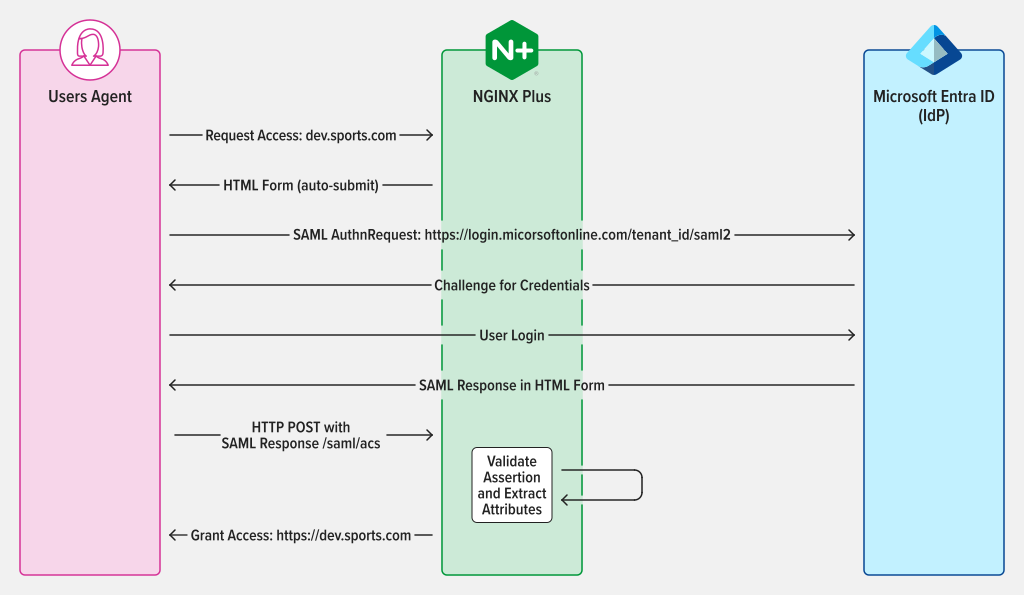
图1:由SAML SP发起的SSO,AuthnRequest和Response使用POST绑定
步骤 1:将 Microsoft Entra ID 配置为身份提供商
要访问Microsoft Entra ID管理门户,请登录并转到左侧面板。选择“Microsoft Entra ID”,然后单击需要配置SSO的目录名称。选中后,选择“企业应用程序”。
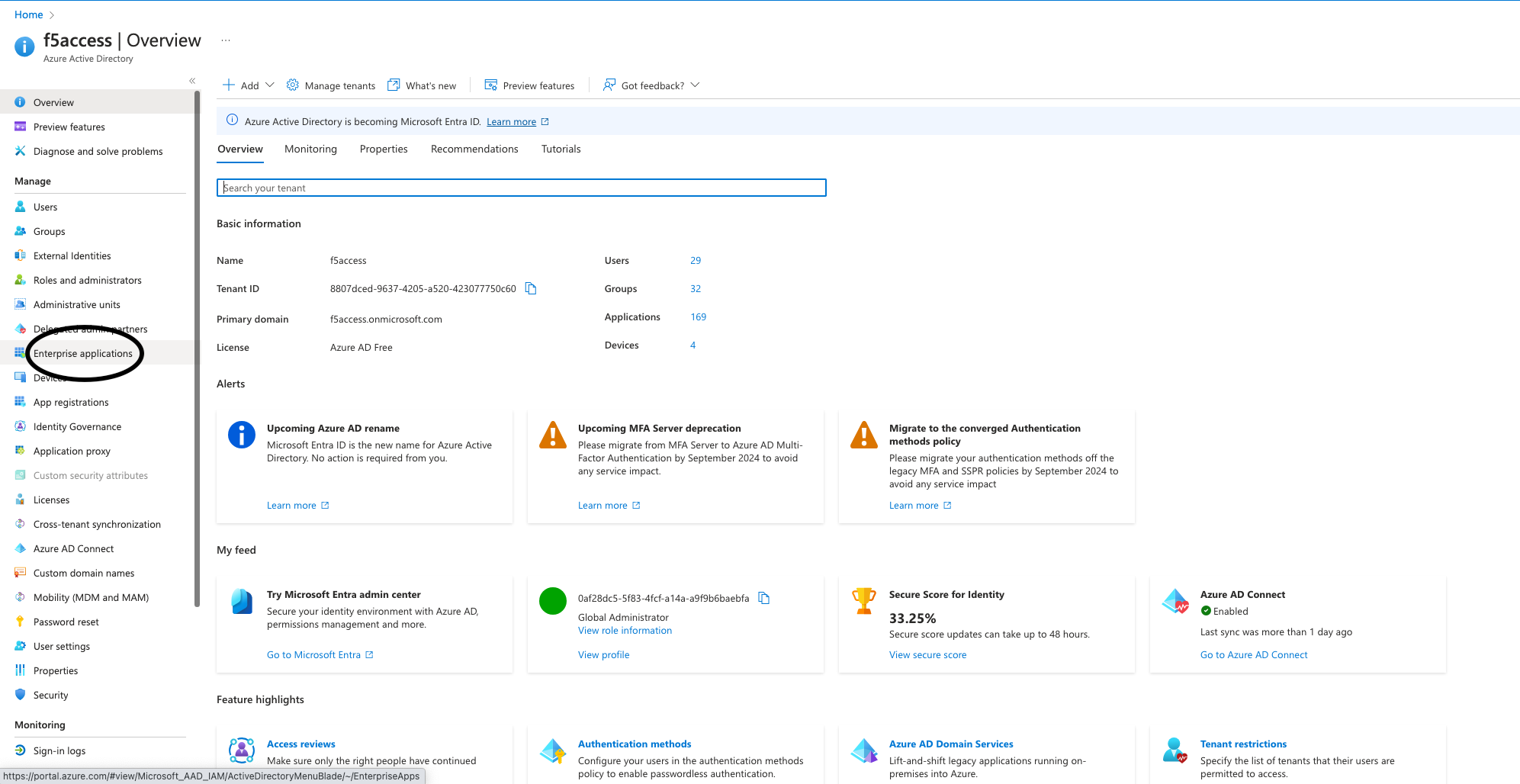
图 2:在管理门户中选择“企业应用程序”
要创建应用程序,请单击门户顶部的“新建应用程序”按钮。在本例中,我们创建了一个名为“demonginx”的应用程序。
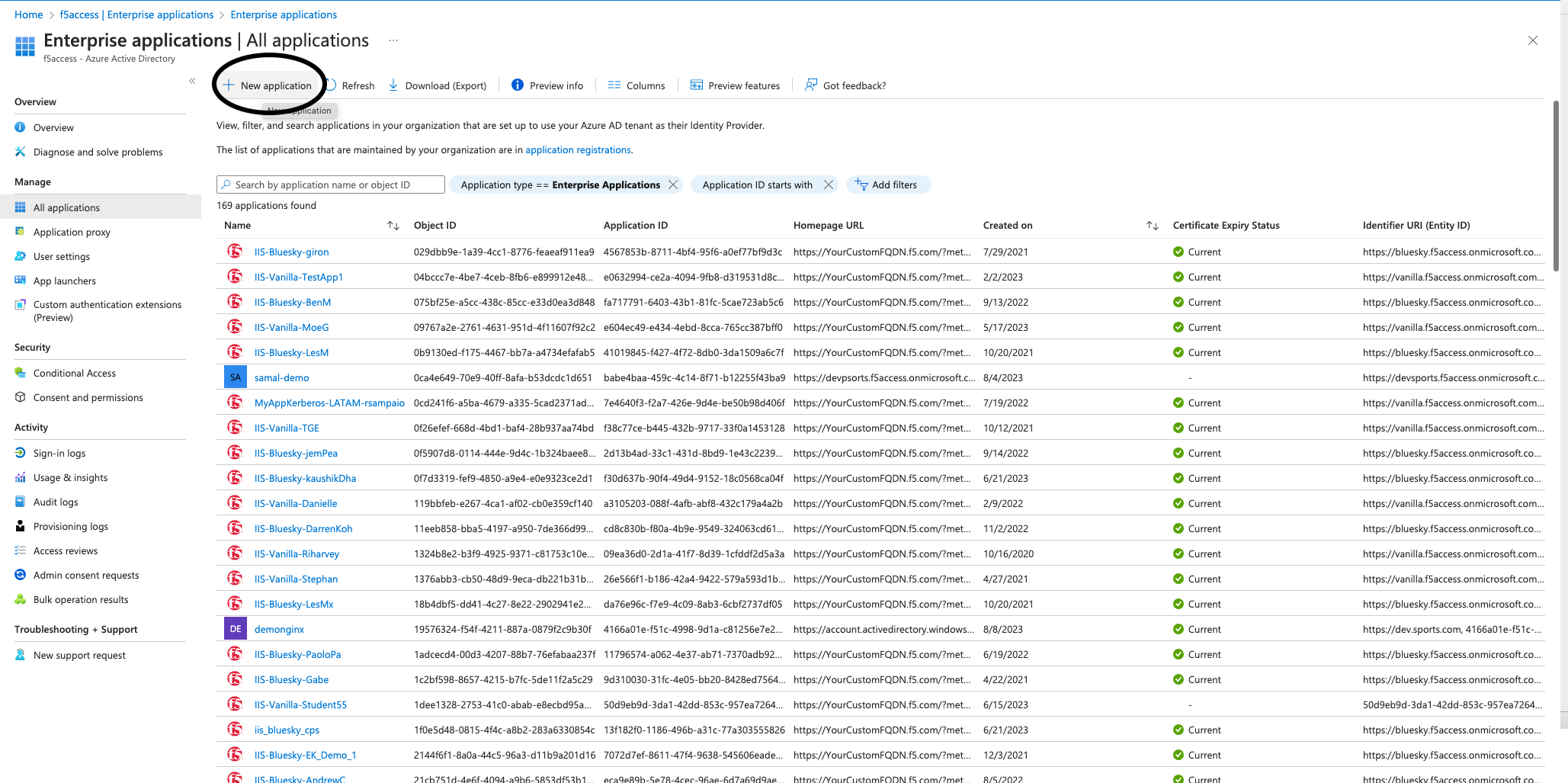
图3:在Microsoft Entra ID中创建新应用程序
重定向到新建应用程序的“概述”页面后,通过左侧菜单转到“入门”,然后点击“单一登录”下的“管理”。接着,选择“SAML”作为“单一登录方法”。
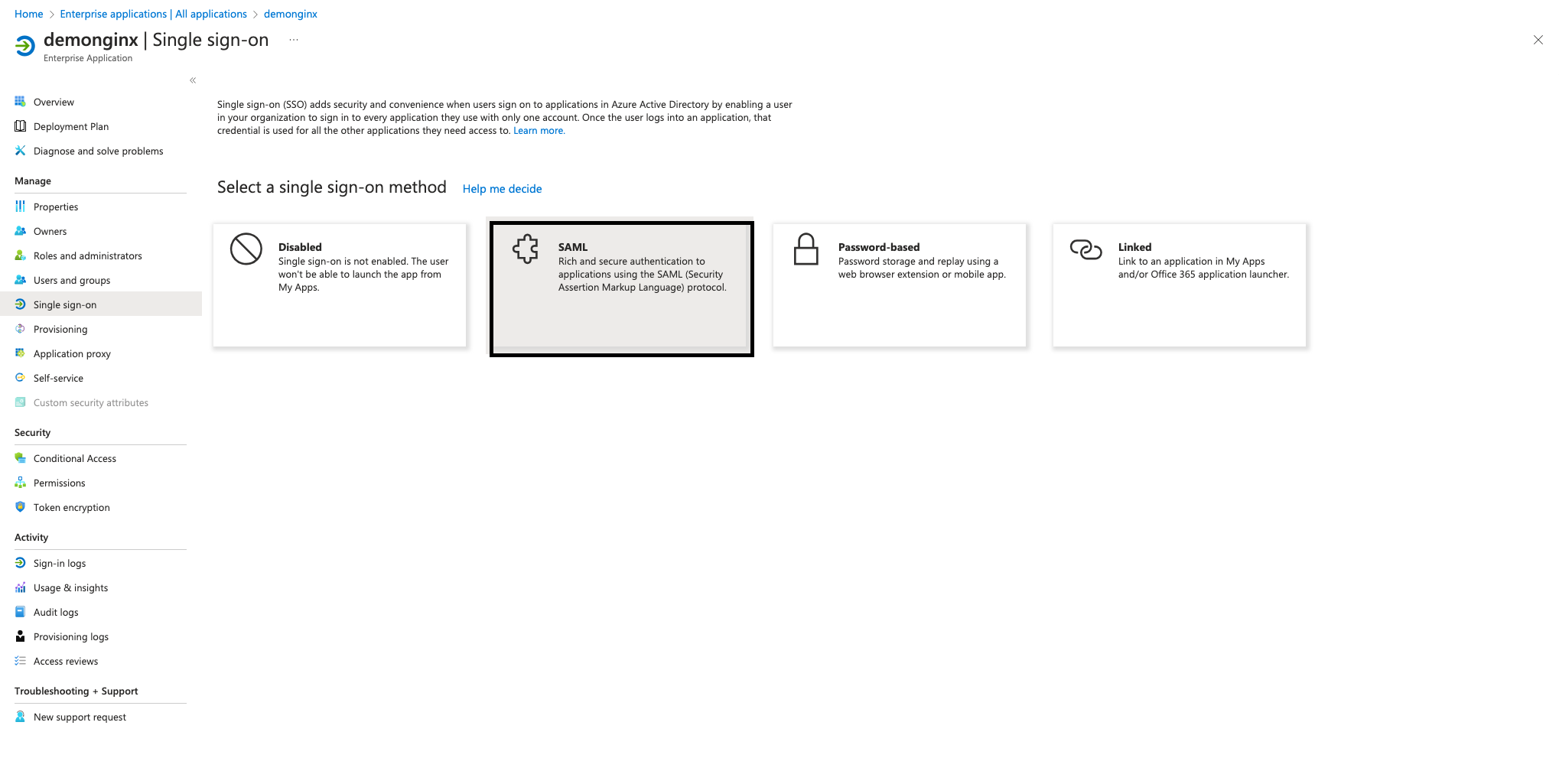
图4:通过SSO部分开始配置SAML
要在企业应用程序中设置SSO,需要在Microsoft Entra ID中将NGINX Plus注册为SP。为此,请单击编辑旁边的铅笔图标,该选项位于基本SAML配置中,如图5所示。
添加以下值,然后点击“保存”:
- 标识符(实体 ID):https://dev.sports.com
- 回复 URL(断言使用者服务 URL):https://dev.sports.com/saml/acs
- 登录 URL:https://dev.sports.com
- 注销 URL(可选):https://dev.sports.com/saml/sls
验证证书为可选项。启用此设置时,必须处理NGINX中的两个配置选项:
- 要使用公钥验证签名,需要将
$saml_sp_sign_authn设置为true。此设置会指示SP对发送至IdP的AuthnRequest进行签名。 - 配置
$saml_sp_signing_key,指定用于此签名的私钥路径。请务必将对应的公钥证书上传到Microsoft Entra ID,以便验证签名。
注意:在此演示中,属性和声明已修改,并添加了新的SAML属性。这些SAML属性由IdP发送。请确保NGINX配置能够正确接收和处理这些属性。可以在NGINX GitHub存储库中检查并调整相关设置。
从Microsoft Entra ID下载IdP的“证书(原始)”,并将其保存到NGINX Plus实例。
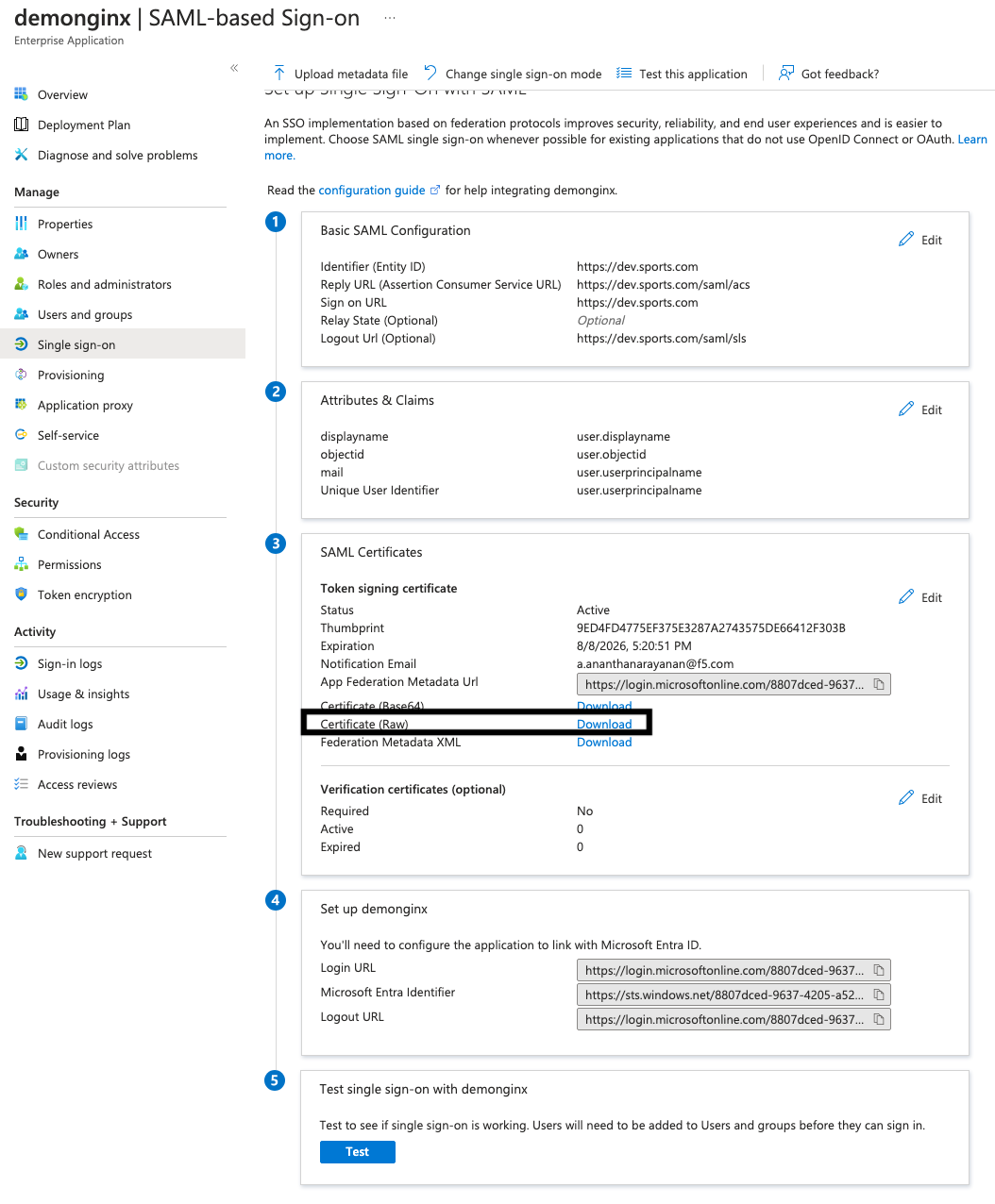
图5:从Microsoft Entra ID下载IdP证书(原始)
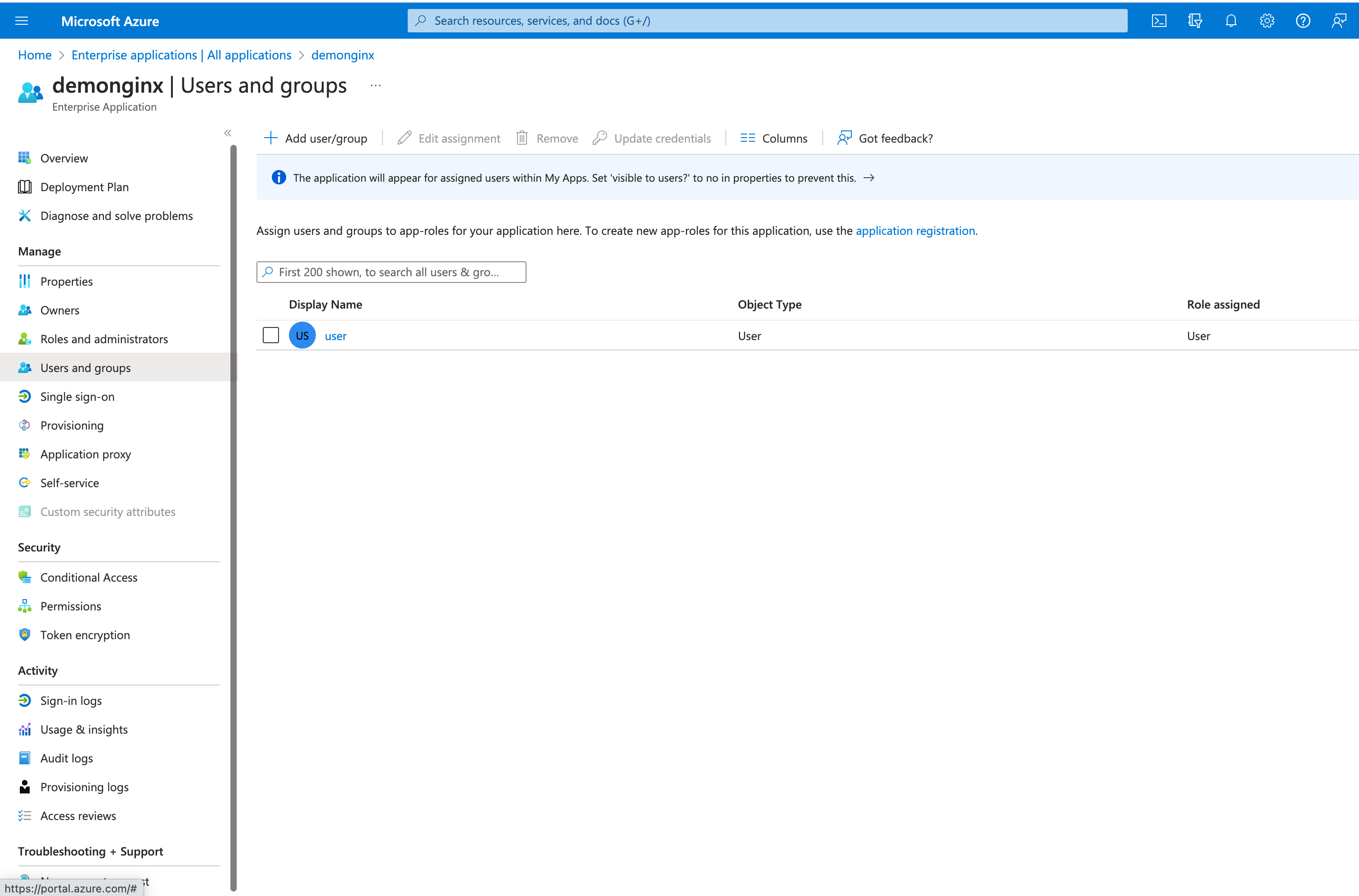
图6:添加新用户或组
在 Microsoft Entra ID 中,可以通过添加或分配用户和组,授予其访问已启用 SSO 的公司应用的权限。
在左侧菜单中,单击“用户和组”,然后单击顶部的“添加用户/组”按钮。
步骤 2:配置 SAML 设置,并将 NGINX Plus 配置为反向代理
在NGINX Plus SP中配置文件之前,请确保已具备所需的证书:
- 用于终止TLS会话的证书(
dev.sports.com.crt and dev.sports.com.key) - 从 Microsoft Entra ID 下载的用于验证 IdP 签名的证书(
demonginx.cer)
注意:证书必须采用SPKI格式。
要开始此步骤,请从Microsoft Entra ID下载用于签名验证的IdP证书。然后,将PEM格式转换为DER格式:
openssl x509 -in demonginx.cer -outform DER -out demonginx.der
如需验证SAML SP断言,建议使用与TLS终止所用密钥不同的公钥和私钥。
提取SPKI格式的公钥证书:
openssl x509 -inform DER -in demonginx.der -pubkey -noout > demonginx.spki
编辑frontend.conf文件以更新以下项目:
ssl_certificate,更新此项以包含TLS证书路径。ssl_certificate_key,更新此项以包含TLS私钥路径。
在生产部署中,可以根据业务需求使用不同的后端目标。在本示例中,后端提供自定义响应:
“欢迎访问应用程序页面n我的对象ID是$http_objectidn我的电子邮件地址是$http_mailn”;
我们修改了Microsoft Entra ID中的属性和声明,为用户新增了mail和objectid声明。通过这些更新,应用可以提供更加个性化、更符合用户需求的响应,从而改善用户体验。
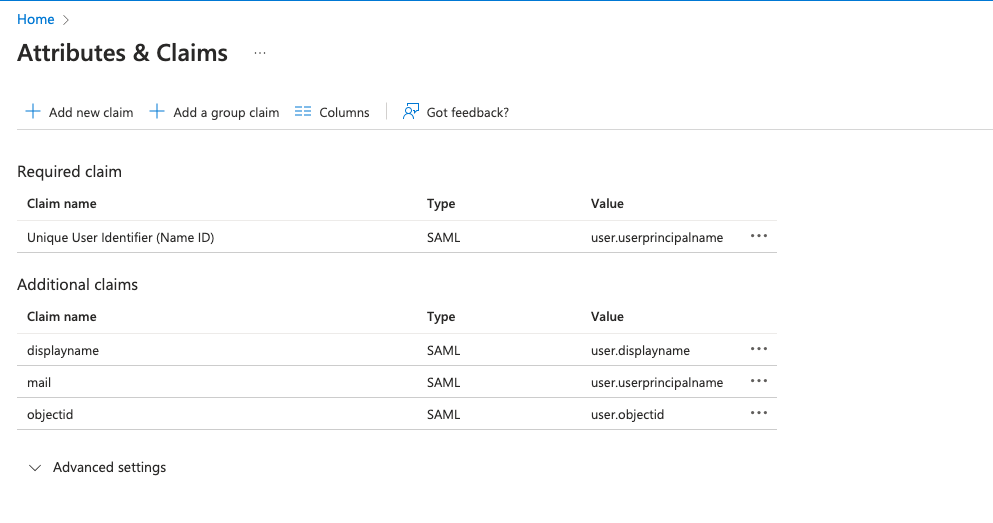
图7:Microsoft Entra ID中修改后的属性和声明
下一步是配置NGINX,由其将流量代理到后端应用。在本演示中,后端SAML应用可通过以下公共地址访问:https://dev.sports.com。
编辑frontend.conf文件:
# This is file frontend.conf
# This is the backend application we are protecting with SAML SSO
upstream my_backend {
    zone my_backend 64k;
    server dev.sports.com;
}

# Custom log format to include the 'NameID' subject in the REMOTE_USER field
log_format saml_sso '$remote_addr - $saml_name_id [$time_local] "$request" "$host" '
                    '$status $body_bytes_sent "$http_referer" '
                    '"$http_user_agent" "$http_x_forwarded_for"';

# The frontend server - reverse proxy with SAML SSO authentication
#
server {
    # Functional locations implementing SAML SSO support
    include conf.d/saml_sp.server_conf;


    # Reduce severity level as required
    error_log /var/log/nginx/error.log debug;
    listen 443 ssl;
    ssl_certificate     /home/ubuntu/dev.sports.com.crt;
    ssl_certificate_key  /home/ubuntu/dev.sports.com.key;
    ssl_session_cache shared:SSL:5m;


    location / {
        # When a user is not authenticated (i.e., the "saml_access_granted."
        # variable is not set to "1"), an HTTP 401 Unauthorized error is
        # returned, which is handled by the @do_samlsp_flow named location.
        error_page 401 = @do_samlsp_flow;

        if ($saml_access_granted != "1") {
            return 401;
        }

        # Successfully authenticated users are proxied to the backend,
        # with the NameID attribute passed as an HTTP header
        proxy_set_header mail $saml_attrib_mail;  # Microsoft Entra ID's user.mail
        proxy_set_header objectid $saml_attrib_objectid; # Microsoft Entra ID's objectid
        access_log /var/log/nginx/access.log saml_sso;
        proxy_pass http://my_backend;
        proxy_set_header Host dev.sports.com;
        return 200 "Welcome to Application pagen My objectid is $http_objectidn My email is $http_mailn";
        default_type text/plain;

   }
}
# vim: syntax=nginx
要使属性“saml_attrib_mail”和“saml_attrib_ objectid”反映在NGINX配置中,请按如下方式更新“saml_sp_configuration.conf”中的键值存储部分:
keyval_zone    zone=saml_attrib_mail:1M                state=/var/lib/nginx/state/saml_attrib_email.json   timeout=1h;
keyval   $cookie_auth_token $saml_attrib_mail    zone=saml_attrib_mail;

 keyval_zone zone=saml_attrib_objectid:1M            state=/var/lib/nginx/state/saml_attrib_objectid.json   timeout=1h;
keyval   $cookie_auth_token $saml_attrib_objectid   zone=saml_attrib_objectid;
接下来,配置SAML SSO配置文件。此文件包含SP和IdP的主要配置。要根据具体的SP和IdP设置进行自定义,需要调整文件中包含的多个map{}块。
下表说明了saml_sp_configuration.conf中的变量:
| 变量 | 说明 |
|---|---|
saml_sp_entity_id | 用户用于访问应用程序的URL。 |
saml_sp_acs_url | 服务提供商用于接收和处理SAML响应、提取用户身份,并根据所提供的信息允许或拒绝访问所请求资源的URL。 |
saml_sp_sign_authn | 指定是否应对SP发送到IdP的SAML请求进行签名。签名使用SP签名密钥完成,需要将关联的证书上传到IdP以验证签名。 |
saml_sp_signing_key | 用于对SP发送到IdP的SAML请求进行签名的签名密钥。请务必将关联的证书上传到IdP以验证签名。 |
saml_idp_entity_id | 用于定义IdP的标识。 |
saml_idp_sso_url | SP向其发送SAML断言请求以发起身份验证请求的IdP端点。 |
saml_idp_verification_certificate | 用于验证从IdP收到的已签名SAML断言的证书。该证书由IdP提供,并且必须采用SPKI格式。 |
saml_sp_slo_url | IdP向其发送SAML LogoutRequest(发起注销流程时)或LogoutResponse(确认注销时)的SP端点。 |
saml_sp_sign_slo | 指定是否由SP对SAML注销消息进行签名。 |
saml_idp_slo_url | SP向其发送LogoutRequest(发起注销流程时)或LogoutResponse(确认注销时)的IdP端点。 |
saml_sp_want_signed_slo | 指定SAML SP是否要求对来自IdP的SAML注销响应或请求进行签名。 |
以下代码仅显示此用例在saml_sp_configuration.conf.
注意:请确保配置文件的其余部分(例如键值存储)仍保留在文件中。此外,请根据部署情况正确调整saml_sp_configuration.conf文件中的变量。
 # SAML SSO configuration

map $host $saml_sp_entity_id {
    # Unique identifier that identifies the SP to the IdP.
    # Must be URL or URN.
    default "https://dev.sports.com";
}

map $host $saml_sp_acs_url {
    # The ACS URL, an endpoint on the SP where the IdP
    # will redirect to with its authentication response.
    # Must match the ACS location defined in the "saml_sp.serer_conf" file.
    default "https://dev.sports.com/saml/acs";
}

map $host $saml_sp_request_binding {
    # Refers to the method by which an authentication request is sent from
    # the SP to an IdP during the Single Sign-On (SSO) process.
    # Only HTTP-POST or HTTP-Redirect methods are allowed.
    default 'HTTP-POST';
}

map $host $saml_sp_sign_authn {
    # Whether the SP should sign the AuthnRequest sent to the IdP.
    default "false";
}

map $host $saml_sp_decryption_key {
    # Specifies the private key that the SP uses to decrypt encrypted assertion
    # or NameID from the IdP.
    default "";
}

map $host $saml_sp_force_authn {
    # Whether the SP should force re-authentication of the user by the IdP.
    default "false";
}

map $host $saml_sp_nameid_format {
    # Indicates the desired format of the name identifier in the SAML assertion
    # generated by the IdP. Check section 8.3 of the SAML 2.0 Core specification
    # (http://docs.oasis-open.org/security/saml/v2.0/saml-core-2.0-os.pdf)
    # for the list of allowed NameID Formats.
    default "urn:oasis:names:tc:SAML:1.1:nameid-format:unspecified";
}

map $host $saml_sp_relay_state {
    # Relative or absolute URL the SP should redirect to
    # after successful sign on.
    default "";
}

map $host $saml_sp_want_signed_response {
    # Whether the SP wants the SAML Response from the IdP
    # to be digitally signed.
    default "false";
}

map $host $saml_sp_want_signed_assertion {
    # Whether the SP wants the SAML Assertion from the IdP
    # to be digitally signed.
    default "true";
}

map $host $saml_sp_want_encrypted_assertion {
    # Whether the SP wants the SAML Assertion from the IdP
    # to be encrypted.
    default "false";
}

map $host $saml_idp_entity_id {
    # Unique identifier that identifies the IdP to the SP.
    # Must be URL or URN.
    default "https://sts.windows.net/8807dced-9637-4205-a520-423077750c60/";
}

map $host $saml_idp_sso_url {
    # IdP endpoint that the SP will send the SAML AuthnRequest to initiate
    # an authentication process.
    default "https://login.microsoftonline.com/8807dced-9637-4205-a520-423077750c60/saml2";
}

map $host $saml_idp_verification_certificate {
    # Certificate file that will be used to verify the digital signature
    # on the SAML Response, LogoutRequest or LogoutResponse received from IdP.
    # Must be public key in PKCS#1 format. See documentation on how to convert
    # X.509 PEM to DER format.
    default "/etc/nginx/conf.d/demonginx.spki";
}

######### Single Logout (SLO) #########

map $host $saml_sp_slo_url {
    # SP endpoint that the IdP will send the SAML LogoutRequest to initiate
    # a logout process or LogoutResponse to confirm the logout.
    default "https://dev.sports.com/saml/sls";
}

map $host $saml_sp_slo_binding {
    # Refers to the method by which a LogoutRequest or LogoutResponse
    # is sent from the SP to an IdP during the Single Logout (SLO) process.
    # Only HTTP-POST or HTTP-Redirect methods are allowed.
    default 'HTTP-POST';
}

map $host $saml_sp_sign_slo {
    # Whether the SP must sign the LogoutRequest or LogoutResponse
    # sent to the IdP.
    default "false";
}

map $host $saml_idp_slo_url {
    # IdP endpoint that the SP will send the LogoutRequest to initiate
    # a logout process or LogoutResponse to confirm the logout.
    # If not set, the SAML Single Logout (SLO) feature is DISABLED and
    # requests to the 'logout' location will result in the termination
    # of the user session and a redirect to the logout landing page.
    default "https://login.microsoftonline.com/8807dced-9637-4205-a520-423077750c60/saml2";
}

map $host $saml_sp_want_signed_slo {
    # Whether the SP wants the SAML LogoutRequest or LogoutResponse from the IdP
    # to be digitally signed.
    default "true";
}

map $host $saml_logout_landing_page {
    # Where to redirect user after requesting /logout location. This can be
    # replaced with a custom logout page, or complete URL.
    default "/_logout"; # Built-in, simple logout page
}

map $proto $saml_cookie_flags {
    http  "Path=/; SameSite=lax;"; # For HTTP/plaintext testing
    https "Path=/; SameSite=lax; HttpOnly; Secure;"; # Production recommendation
}

map $http_x_forwarded_port $redirect_base {
    ""      $proto://$host:$server_port;
    default $proto://$host:$http_x_forwarded_port;
}

map $http_x_forwarded_proto $proto {
    ""      $scheme;
    default $http_x_forwarded_proto;
}
# ADVANCED CONFIGURATION BELOW THIS LINE
# Additional advanced configuration (server context) in saml_sp.server_conf

######### Shared memory zones that keep the SAML-related key-value databases

# Zone for storing AuthnRequest and LogoutRequest message identifiers (ID)
# to prevent replay attacks. (REQUIRED)
# Timeout determines how long the SP waits for a response from the IDP,
# i.e. how long the user authentication process can take.
keyval_zone zone=saml_request_id:1M                 state=/var/lib/nginx/state/saml_request_id.json                  timeout=5m;

# Zone for storing SAML Response message identifiers (ID) to prevent replay attacks. (REQUIRED)
# Timeout determines how long the SP keeps IDs to prevent reuse.
keyval_zone zone=saml_response_id:1M                state=/var/lib/nginx/state/saml_response_id.json                 timeout=1h;

# Zone for storing SAML session access information. (REQUIRED)
# Timeout determines how long the SP keeps session access decision (the session lifetime).
keyval_zone zone=saml_session_access:1M             state=/var/lib/nginx/state/saml_session_access.json              timeout=1h;

# Zone for storing SAML NameID values. (REQUIRED)
# Timeout determines how long the SP keeps NameID values. Must be equal to session lifetime.
keyval_zone zone=saml_name_id:1M                    state=/var/lib/nginx/state/saml_name_id.json                     timeout=1h;

# Zone for storing SAML NameID format values. (REQUIRED)
# Timeout determines how long the SP keeps NameID format values. Must be equal to session lifetime.
keyval_zone zone=saml_name_id_format:1M             state=/var/lib/nginx/state/saml_name_id_format.json              timeout=1h;

# Zone for storing SAML SessionIndex values. (REQUIRED)
# Timeout determines how long the SP keeps SessionIndex values. Must be equal to session lifetime.
keyval_zone zone=saml_session_index:1M              state=/var/lib/nginx/state/saml_session_index.json               timeout=1h;

# Zone for storing SAML AuthnContextClassRef values. (REQUIRED)
# Timeout determines how long the SP keeps AuthnContextClassRef values. Must be equal to session lifetime.
keyval_zone zone=saml_authn_context_class_ref:1M    state=/var/lib/nginx/state/saml_authn_context_class_ref.json     timeout=1h;

# Zones for storing SAML attributes values. (OPTIONAL)
# Timeout determines how long the SP keeps attributes values. Must be equal to session lifetime.
keyval_zone zone=saml_attrib_uid:1M                 state=/var/lib/nginx/state/saml_attrib_uid.json                  timeout=1h;
keyval_zone zone=saml_attrib_name:1M                state=/var/lib/nginx/state/saml_attrib_name.json                 timeout=1h;
keyval_zone zone=saml_attrib_memberOf:1M            state=/var/lib/nginx/state/saml_attrib_memberOf.json             timeout=1h;

######### SAML-related variables whose value is looked up by the key (session cookie) in the key-value database.

# Required:
keyval $saml_request_id     $saml_request_redeemed          zone=saml_request_id;               # SAML Request ID
keyval $saml_response_id    $saml_response_redeemed         zone=saml_response_id;              # SAML Response ID
keyval $cookie_auth_token   $saml_access_granted            zone=saml_session_access;           # SAML Access decision
keyval $cookie_auth_token   $saml_name_id                   zone=saml_name_id;                  # SAML NameID
keyval $cookie_auth_token   $saml_name_id_format            zone=saml_name_id_format;           # SAML NameIDFormat
keyval $cookie_auth_token   $saml_session_index             zone=saml_session_index;            # SAML SessionIndex
keyval $cookie_auth_token   $saml_authn_context_class_ref   zone=saml_authn_context_class_ref;  # SAML AuthnContextClassRef

# Optional:
keyval $cookie_auth_token   $saml_attrib_uid                zone=saml_attrib_uid;
keyval $cookie_auth_token   $saml_attrib_name               zone=saml_attrib_name;
keyval $cookie_auth_token   $saml_attrib_memberOf           zone=saml_attrib_memberOf;


keyval_zone    zone=saml_attrib_mail:1M                state=/var/lib/nginx/state/saml_attrib_mail.json   timeout=1h;
keyval         $cookie_auth_token $saml_attrib_mail    zone=saml_attrib_mail;

keyval $cookie_auth_token   $saml_attrib_objectid           zone=saml_attrib_objectid;
keyval_zone zone=saml_attrib_objectid:1M            state=/var/lib/nginx/state/saml_attrib_objectid.json             timeout=1h;


######### Imports a module that implements SAML SSO and SLO functionality
js_import samlsp from conf.d/saml_sp.js;
步骤3:测试配置
测试该配置需要完成两个部分:
- 验证SAML流程
- 测试由SP发起的注销功能
验证SAML流程
使用NGINX Plus配置SAML SP并使用Microsoft Entra ID配置IdP后,必须验证SAML流程。此验证过程可确保用户通过IdP成功完成身份验证,并获得对受SP保护资源的访问权限。
要验证由SP发起的SAML流程,请打开常用浏览器,并在地址栏中输入https://dev.sports.com。随后将跳转到IdP登录页面。
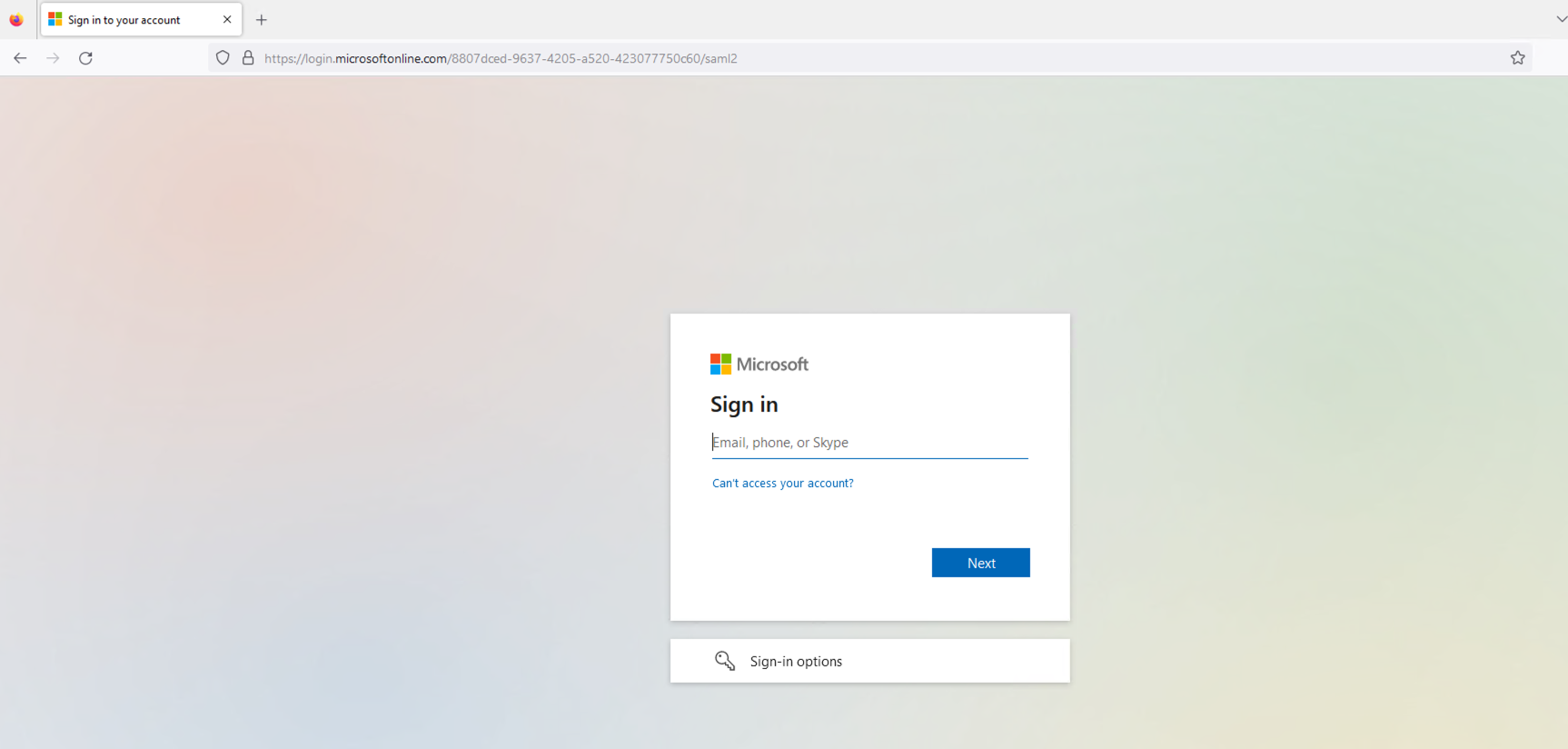
图8:IdP登录页面
输入已在IdP登录页面中配置的用户凭据。提交后,IdP将对该用户进行身份验证。
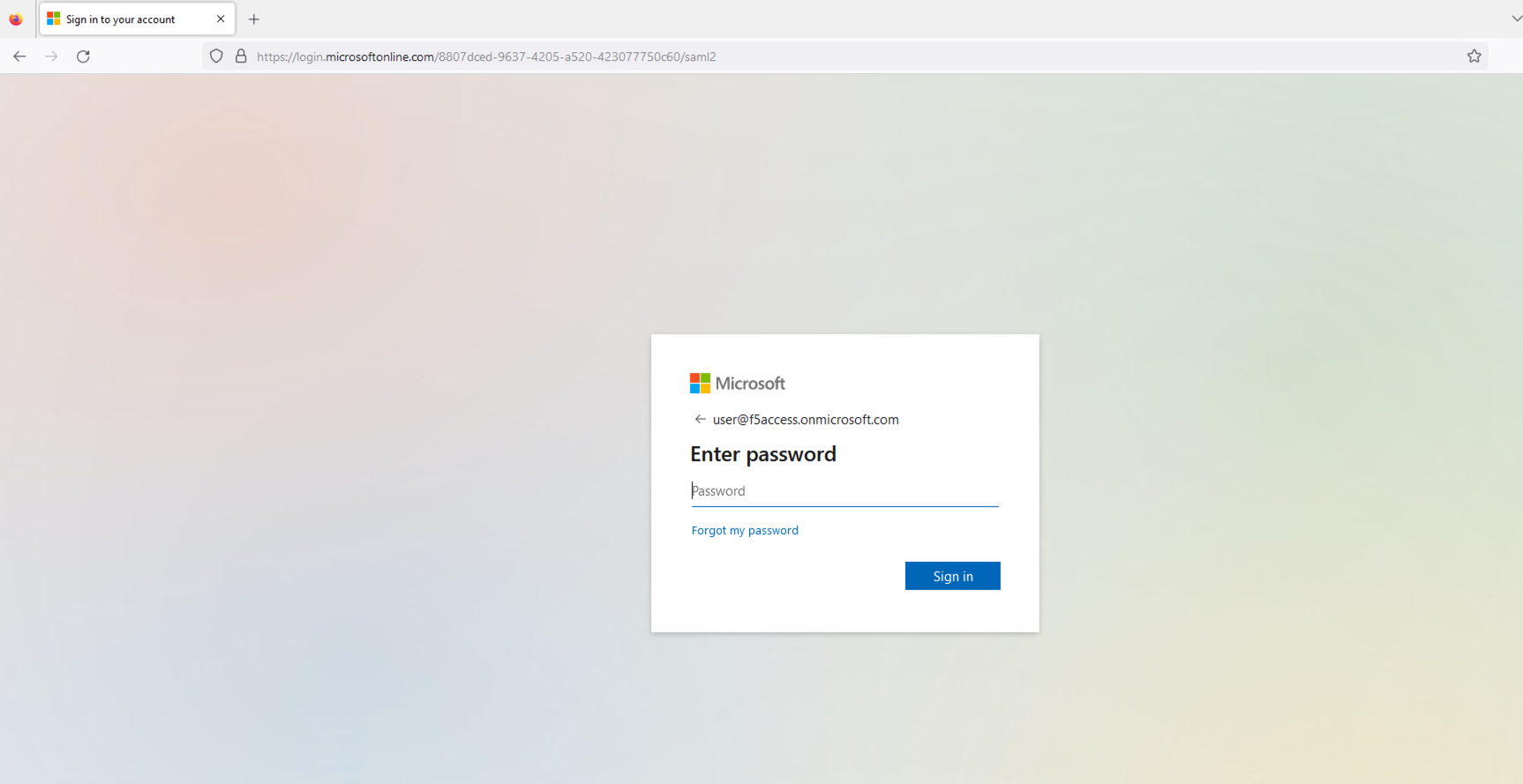
图9:输入已配置用户的凭据
成功建立会话后,用户将获得对之前请求的受保护资源的访问权限。随后,该资源将显示在用户的浏览器中。
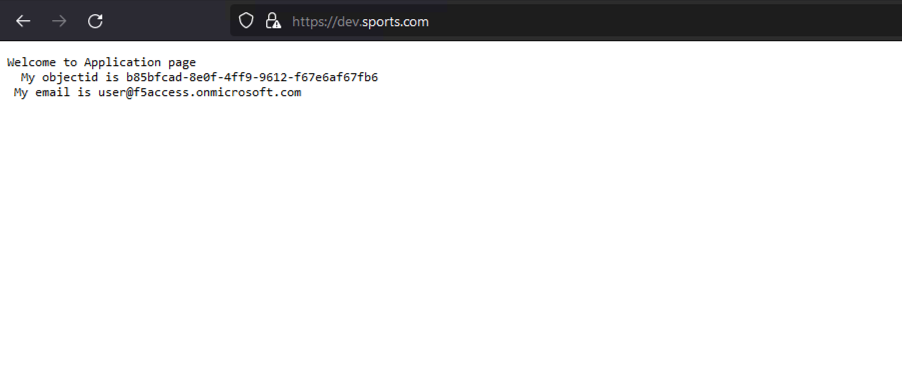
图 10:成功加载的应用程序页面
检查SP和IdP日志可获取有关SAML流程的重要信息。在SP端(NGINX Plus),请确保auth_token Cookie设置正确。在IdP端(Microsoft Entra ID),请确保身份验证过程顺利完成且未出现错误,并且SAML断言已发送至SP。
NGINX的access.log应如下所示:
127.0.0.1 - - [14/Aug/2023:21:25:49 +0000] "GET / HTTP/1.0" 200 127 "https://login.microsoftonline.com/" "Mozilla/5.0 (Macintosh; Intel Mac OS X 10_15_7) AppleWebKit/605.1.15 (KHTML, like Gecko) Version/16.1 Safari/605.1.15" "-"

99.187.244.63 - Akash Ananthanarayanan [14/Aug/2023:21:25:49 +0000] "GET / HTTP/1.1" "dev.sports.com" 200 127 "https://login.microsoftonline.com/" "Mozilla/5.0 (Macintosh; Intel Mac OS X 10_15_7) AppleWebKit/605.1.15 (KHTML, like Gecko) Version/16.1 Safari/605.1.15" "-
而NGINX的debug.log如下所示:
2023/08/14 21:25:49 [info] 27513#27513: *399 js: SAML SP success, creating session _d4db9b93c415ee7b4e057a4bb195df6cd0be7e4d
测试由SP发起的注销功能
SAML单点注销(SLO)让用户只需执行一次操作,即可从所有相关的IdP和SP中注销。NGINX Plus支持SP发起和IdP发起的注销场景,有助于提升SSO环境中的安全性和用户体验。本示例采用SP发起的注销场景。
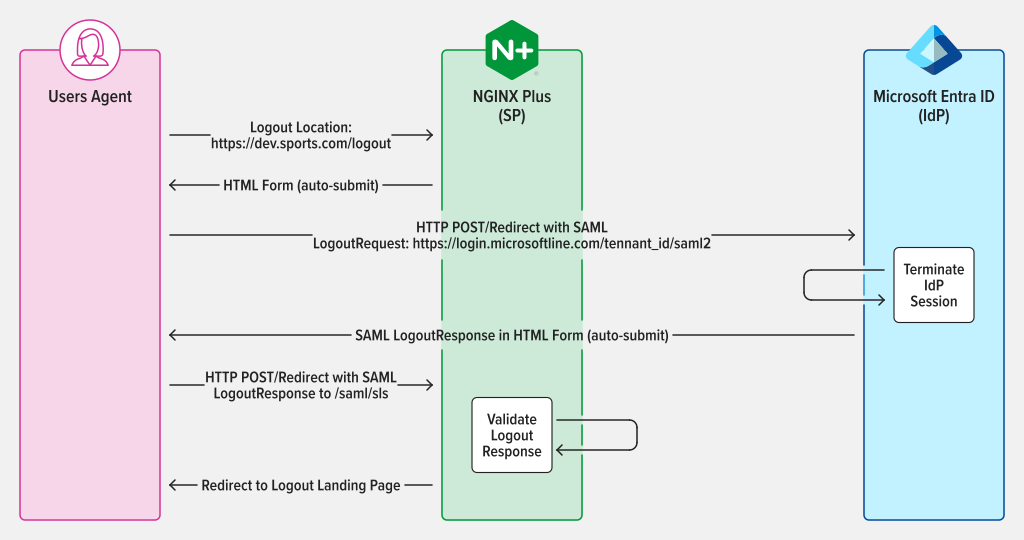
图11:SAML SP发起的SLO,LogoutRequest和LogoutResponse使用POST/重定向绑定
会话通过身份验证后,访问SP中配置的注销URL以退出登录。例如,如果已在NGINX Plus中将“https://dev.sports.com/logout”设置为注销URL,请在浏览器地址栏中输入该URL。
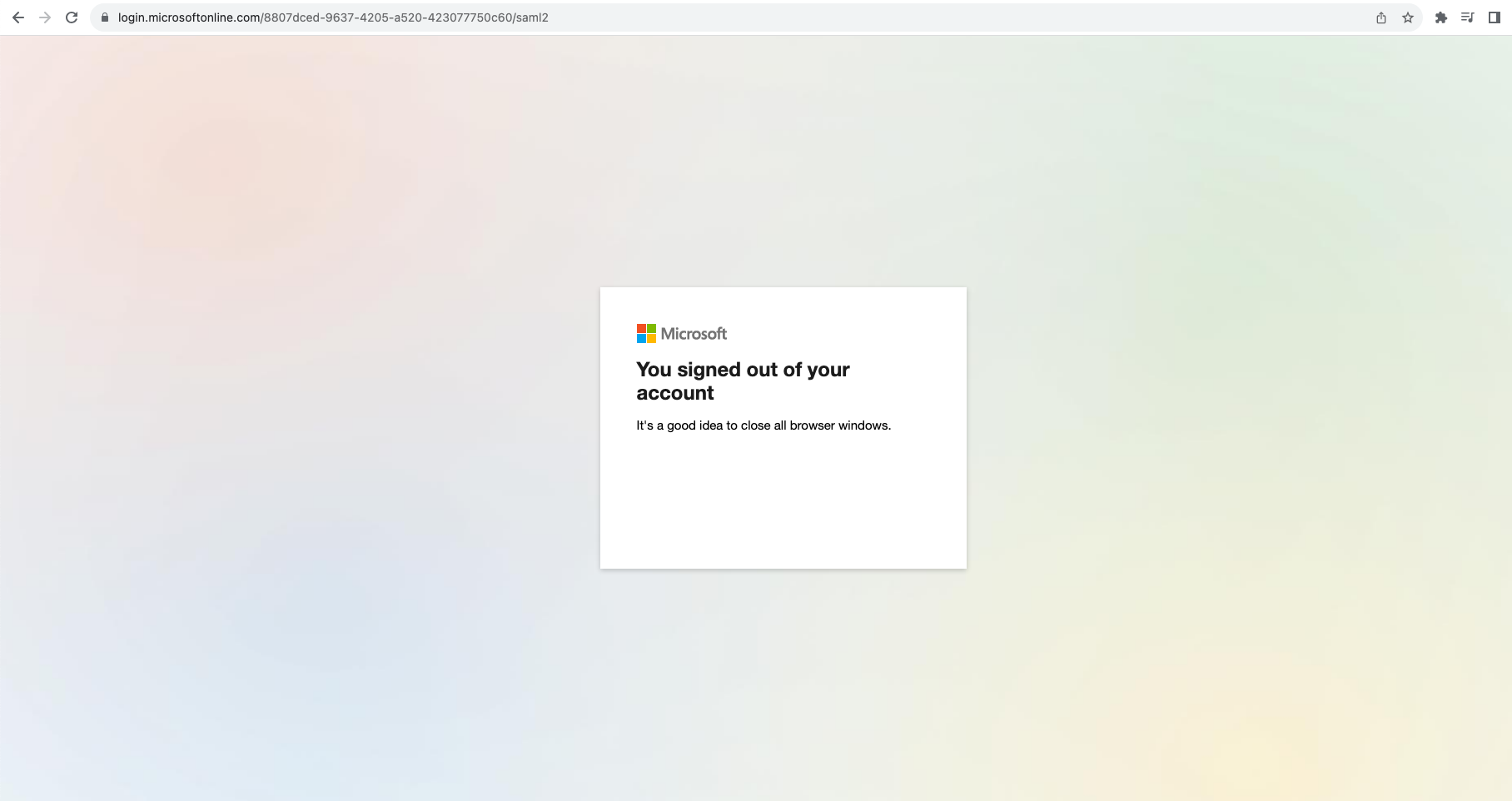
图12:成功退出会话
为确保安全注销,SP必须发起SAML请求,由IdP进行验证和处理。此操作会终止用户会话,随后IdP将发送SAML响应,把用户的浏览器重定向回SP。
结论
恭喜!NGINX Plus现在可以充当SAML服务提供商(SP),进一步提升身份验证流程的安全性和便利性。这项新功能是NGINX Plus的一项重要进展,使其能够为重视安全性和效率的组织提供更稳健、更灵活的解决方案。
详细了解如何将SAML与NGINX Plus结合使用
立即开始NGINX Plus 30 天免费试用,即可使用SAML。希望这项功能对您有所帮助,也欢迎提供反馈。
以下资源提供了有关NGINX Plus与SAML集成的更多信息。
关于作者

相关博客文章

NGINX Plus R26 正式发布
NGINX Plus R26通过缓存JSON Web密钥集加快JWT验证,并强化TLS握手,从而提升安全性。NGINX JavaScript的新功能包括增强对异步函数的支持,以及实现WebCrypto API。
使用NGINX App Protect DoS保护gRPC应用,抵御严重的DoS攻击
gRPC具备开发人员设计和部署现代应用所需的速度与灵活性,但其开放性也使其极易受到第7层DoS攻击。NGINX App Protect DoS可保护gRPC应用免受此类破坏性攻击。
Ingress Controller 选型指南(第 2 部分):风险与面向未来的规划
了解选择错误的Ingress控制器可能带来的风险,以及如何从关键方面着手,让您的选择更好地适应未来需求。
NGINX Plus R19 正式发布
NGINX Plus R19扩展了监控功能,不仅提供更多指标,还新增了指标分析方式;增加试运行模式,用于测试限速效果;增强键值存储,以支持IP地址范围;并使限速更加动态。
NGINX现已正式加入F5
NGINX现已正式成为F5的一部分。Gus Robertson现任F5 NGINX业务部门负责人。他阐述了两家公司在人才、文化和愿景方面融合的价值,以及双方将如何携手增强NGINX的开源产品和商业产品。